Projects

What I've built, and what it did.

The tool itself, one number, a diagram of what talks to what, and the bit that broke.

Slimedom: booking system and site

A slime-workshop business opening its second branch. Parents gave up on its four-screen booking plugin and phoned instead. Staff kept two diaries. There were almost no photos, because parents don't want their children filmed.

  • SME client
  • TypeScript
  • APIs
  • Built with Claude Code

2 venues → 1 flowevery step on their site, except paying

Slimedom, workshops and parties, London and Essex

Problem

  • Two venues, one Book button that didn't ask which.
  • Four screens to book a workshop. Parents gave up and phoned.
  • Parties booked by phone anyway. Slots opened on demand, so the diary lived in staff's heads.
  • Walk-ins and phone bookings keyed in by hand, with no link back to what was sold online.
  • No photos. Parents don't want their children filmed.

What it does

  • One booking flow for both venues. Venue, day, time, places, details, all on the site. Only the card payment is Wix's page, then straight back to a ticket.
  • Wix Bookings underneath. Bought, not built. After calls with providers, Wix. Services, prices and limits are read live from each venue's Wix project, so staff change them in Wix and the site follows.
  • The rules Wix doesn't have, as automations. South Woodford is one room: a party books out the hour, a workshop blocks a party. Wix Automations fire on each booking and Velo code closes the other slot. One automation per case.
  • A fix for Wix's own pay links. Staff-made bookings sent customers a link missing part of its URL. An automation catches each one and sends a working link.
  • One diary. Online, walk-in and phone bookings all land in the same Wix dashboard, with payments.
  • A brand and a picture library without a photoshoot. Style guide agreed with the owner, then 13 stills, 5 clips and 6 stickers generated in Google Flow to one continuity brief. Hands only on video.
  • Handover. Three owner walkthroughs, staff trained on the dashboard, a launch checklist for domain, email and cutover.

How it works

Before and after

The old Slimedom home page: a navy header, a stock photo of slime tubs, a gradient banner and three pale workshop cards.
The old booking plugin: a small panel in the middle of an empty page, a sidebar of four steps and a grey calendar with month and year dropdowns.
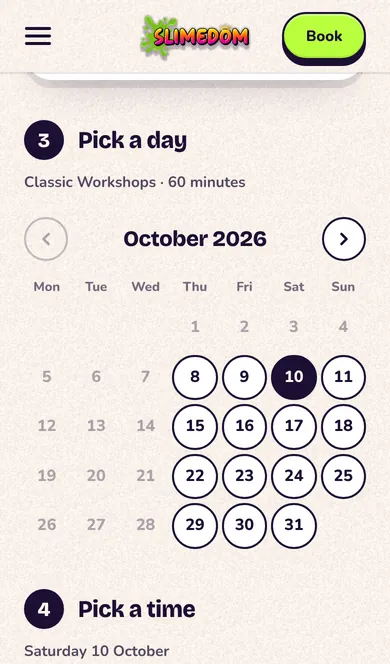
The new booking page: Pick a day, a calendar of round buttons with the free days outlined and Saturday 10 October chosen, and Pick a time beside it with four time chips.

The look

Three Slimedom tubs of green, pink and blue slime on a flat purple ground, one lid propped against the middle tub.
A workshop station from above: pots of coloured slime, glitter, beads and lolly sticks on a glossy purple table, a red apron, and one hand pressing into pink slime.
Decoden close-up: two hands piping white cream onto a pink compact, a tray of charms in front and the dispenser wall behind.
A single tub of pink slime floating on lime green, the lid tipped open and a drip hanging off the rim.
  • Slime Green
  • Goo Pink
  • Grape
  • Sunny
  • Ice
  • Cloud
  • Ink

All generated, and the site's footer says so. The table's purple is the brand's Grape.

See it

The home page on a phone: the headline over the slime clip, a Book now button and two venue pills.
Home
Booking on a phone: step 3, Pick a day, a month of round date buttons with the free days outlined and one chosen.
Pick a day
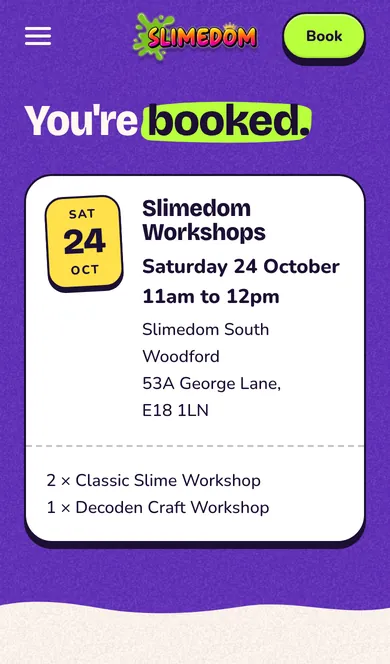
The thank-you page on a phone: You're booked, over a white ticket with a yellow date tab, the workshop, time, address and what was booked.
Back from paying
Open the live site Live on the client's domain from launch week

What broke

  • Wix's own booking form couldn't read the IDs its newer availability API returns. So the whole front end is ours. Wix only sees a booking and a checkout.
  • Wix had no rule for one room, two services. A workshop and a party could land in the same hour. Hence the automations.
  • Wix's pay links were broken on every booking staff made by hand. Hence the second set.
  • Wix sometimes never answers. Twenty-second timeouts, resume from the failed step, never order a finished checkout twice.
  • Flow refuses any frame with a child in it. Every clip is text-to-video, hands and slime only.
  • The owner's walkthroughs cut as much as they added. Prices off the pages, no deposits, no "open now" badges, no drip animations.

With Claude Code

Me

  • The brief, the brand and the style guide, with the owner
  • Buy versus build, the provider calls, the choice of Wix
  • The automation logic: which trigger, which case, which rule
  • Every picture and clip, generated in Google Flow
  • Owner walkthroughs, staff training, the launch plan

Claude Code

  • The reference research behind the lookbook, fifteen sites
  • Most of the code: the pages, the motion, the booking flow and its retries
  • The Velo scripts the automations run
  • The pipeline that encoded the picture library for the web

Council Planning Tracker

A construction SME found new work by leafleting homes that had just applied for planning permission. Finding those homes meant searching 16 council portals, one at a time, about five hours a week.

  • SME client
  • TypeScript
  • APIs
  • Built with Claude Code

5 hrs → 15 minper week, from 16 portals to a lead list

A construction SME, London · archived

Problem

Every extension starts as a planning application, and the firm wins the job by getting a leaflet through that door first. Each borough has its own portal with its own clunky search, so one person spent five hours a week going through them one by one and copying addresses into notes.

What it does

  • Pick the boroughs and a date range. One search covers all 16.
  • Asks each council's portal for newly registered applications. Results stream back live, borough by borough, and one council being down doesn't stop the rest.
  • Splits messy addresses into proper fields, looks up missing postcodes, and tags each job by type: loft conversion, rear extension, new build.
  • "Buildable jobs only" hides the noise (tree works, advert signs), then one click exports a clean Excel file ready for a mail-merge.

How it works

See it

Watch the walkthrough Source on GitHub Two minutes, voiced. Archived: built for a client, no longer maintained.
  1. The borough list with a few ticked, and a date range.
    1 · Pick boroughs and dates
  2. Live progress: each borough marked as done, running or failed while the search runs.
    2 · Live progress per borough
  3. Results for four boroughs, tagged by job type and filtered to rear extensions.
    3 · Tagged, filtered results
  4. The exported spreadsheet: one row per application with split address fields, postcode and job type.
    4 · The Excel export

What broke

  • Netlify got blocked. The council portals refused its requests. Moved to Railway, an always-on server.
  • Croydon dropped a third of its results. Quietly. Only showed up when checked against the portal by hand.
  • Brent came back empty on wide date ranges.
  • One address froze the server. "Hampton Court", Richmond.
  • Lesson: the work was cleaning data, not fetching it. 32 tests now guard address parsing, job tagging and dates.

With Claude Code

Me

  • Requirements, worked out with the client
  • Product calls: which job types matter, "buildable only", live progress, the move to Railway
  • Testing every release against real council data
  • Reviewing every change before it shipped

Claude Code

  • Most of the code: adapters, address parser, job classifier, interface, Excel export
  • The 32 tests
  • Diagnosing bugs from my descriptions
  • Explaining sessions, tokens and server-sent events as we went